SASSA Change Phone Number Without OTP

SASSA Change Phone Number Without OTP. Every year, thousands of SASSA beneficiaries find themselves locked out of a critical problem: they need to update their registered mobile number, but they no longer have access to the old one. No access to the old SIM means no OTP. No OTP means no online update. It feels like a dead end but it doesn’t have to be.
If you’ve been searching for a way to do a SASSA change phone number without OTP, you are not alone. Whether your SIM was stolen, damaged, or simply expired, this guide walks you through exactly what SASSA’s system allows, what it doesn’t, and most importantly how to still get your number updated safely and officially.
Why SASSA Requires an OTP to Change Your Phone Number
SASSA (South African Social Security Agency) uses a One-Time PIN (OTP) as a security layer when you attempt to update your registered mobile number online or through self-service channels. The OTP is sent to the phone number currently registered on your profile.
This system exists for very good reasons. Grant fraud is a serious problem in South Africa. Criminals have been known to hijack beneficiary accounts by swapping registered numbers to redirect grant payments. The OTP requirement ensures that the person requesting the change is the legitimate account holder someone who still has physical access to the registered SIM.
Think of it like a bank’s two-factor authentication. It’s there to protect your money and your grant. That said, it creates a genuine challenge when life events a stolen phone, a broken SIM, or a network provider change — cut off your access to that OTP entirely.
You Cannot Fully Bypass the OTP System Online
Let’s be straightforward about something that many websites gloss over: you cannot change your SASSA mobile number entirely without receiving an OTP through self-service online channels. If your goal is to do it entirely via the SRD website or the SASSA online portal without any form of verification, that option simply does not exist.
SASSA has designed its digital systems this way deliberately, and for the right reasons. Any method that claims to let you change your registered SASSA number online without the OTP being involved is either outdated, inaccurate, or potentially a scam. Be very careful of third-party websites or social media posts that claim to offer such a workaround — these are often phishing attempts designed to steal your personal information.
The good news? There are legitimate alternatives. They just require a slightly different approach and in most cases, they involve engaging with SASSA directly in person or through official verified channels.
What Happens When You Can’t Receive the OTP?
Before diving into solutions, it helps to understand which scenario you’re dealing with. The path forward may differ slightly depending on your situation.
Scenario 1: Your SIM Card Is Lost, Damaged, or Stolen
This is the most common situation. Your phone or SIM was lost, and the number registered with SASSA is now inaccessible. In this case, your best first step is contacting your mobile network operator to request a SIM swap or SIM replacement for the same number.
Scenario 2: You’ve Switched to a New Number Entirely
Perhaps you got a new phone and a brand-new number, and you simply never updated your SASSA profile in time. You may still be able to access the old SIM temporarily if you kept it. If the number is still active, the online route remains viable.
Scenario 3: Your Phone Was Stolen and the Number Is Deactivated
In this case, you may not be able to recover the number at all. This is where the in-person SASSA route becomes not just helpful but essential. Do not panic SASSA has a process for this exact situation.
How to Change Your SASSA Number Without OTP
Option 1: Recover Your Old SIM Card First (Then Use Online Portal)
Before visiting a SASSA office, exhaust this option. Contact your mobile network provider — Vodacom, MTN, Cell C, or Telkom — and request a SIM swap for your old number. You’ll need to provide your ID and may need to visit a network branch in person. Once your old number is active on a new SIM, you can:
- Go to the official SASSA SRD website at srd.sassa.gov.za
- Log in using your South African ID number
- Navigate to the “Update Contact Details” section
- Request the OTP to be sent to your recovered number
- Enter the OTP and submit your new phone number
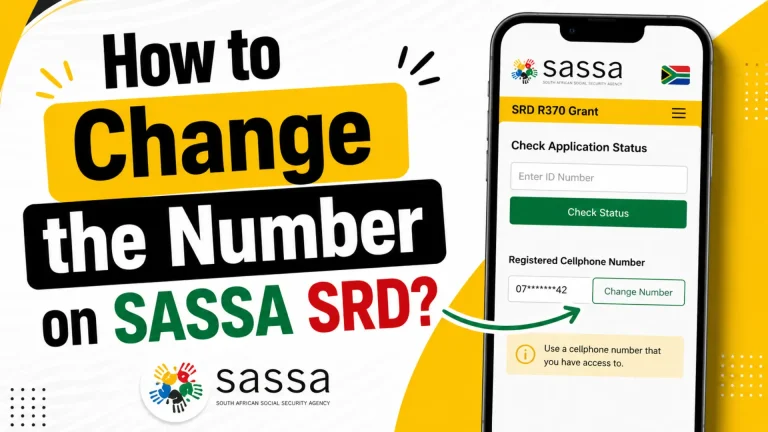
This is the cleanest solution if it’s feasible for your situation. It keeps everything within the online system and avoids queues at SASSA offices. For detailed steps on updating your number digitally once you have access, check out this guide on how to change the number on SASSA SRD.
Option 2: Visit Your Nearest SASSA Local Office in Person
If recovering your old SIM is not possible, visiting a SASSA office is the most reliable route. This is the primary official channel for a SASSA change phone number without OTP when digital methods are unavailable.
What to bring:
- Your original South African ID (green barcoded ID book or smart ID card)
- Your most recent SASSA grant reference or application number (if available)
- Proof of your new phone number (not always required, but helpful — e.g., a prepaid starter pack or network confirmation letter)
At the office:
- Inform the SASSA official at the front desk that you need to update your registered mobile number
- You will be asked to verify your identity this typically involves biometric verification (fingerprint scanning)
- Once verified, a SASSA official can update your registered mobile number on your behalf in their internal system
- You may be issued a reference number for the update keep this safe
The in-person biometric verification process replaces the need for an OTP in this context. SASSA’s staff are trained to handle exactly these situations. While office queues can be frustrating, this remains the most secure and officially supported method.
If you’re concerned about long queues at SASSA offices, read this helpful guide on how to reduce SASSA office queues for practical tips on when and how to visit without wasting hours in line.
Option 3: Use the SRD Online Portal With Your Application ID
For SRD R370 grant beneficiaries specifically, SASSA provides a secondary verification path through the SRD portal using your Application ID rather than relying solely on the OTP. This is particularly useful if you’ve already applied and have your application reference number saved.
- Visit srd.sassa.gov.za
- Select “Update Banking Details” or “Update Contact Details”
- Enter your ID number and Application ID
- In some cases, the system may allow SASSA to send a verification link or code to your new number after identity confirmation
- Follow the prompts carefully — do not close the browser mid-process
This method has limitations and does not always work for every account, but it is worth attempting before making the trip to an office. You can find a more in-depth breakdown of this method in our guide on changing your SRD cellphone number online with your Application ID.
Option 4: Contact SASSA via the Official Helpline
SASSA operates a toll-free helpline that beneficiaries can use to report issues with their accounts, including mobile number problems. While call centre agents cannot always update your number directly over the phone (for the same security reasons), they can:
- Log a formal request on your behalf
- Escalate your case to a local office
- Guide you on the correct documents to bring
- In some cases, arrange a callback or flag your account for in-person assistance
The official SASSA toll-free number is 0800 60 10 11, available during standard office hours. For a full list of SASSA contact options across provinces, refer to our SASSA contact details page.
OTP Method vs. In-Person Method
| Feature | OTP Online Method | In-Person SASSA Office |
|---|---|---|
| Requires access to old SIM | Yes | No |
| Requires original ID | Yes | Yes |
| Time to complete | Minutes (if OTP received) | 1–3 hours (with queues) |
| Works without phone access | No | Yes |
| Biometric verification used | No | Yes |
| Best suited for | Minor inconvenience / temporary SIM issues | Lost, stolen, or permanently deactivated SIM |
| Officially supported | Yes | Yes |
| Risk of scams | Higher (online) | Lower (in person) |
Things People Often Get Wrong When Changing Their SASSA Number
Understanding the mistakes others make can save you significant time, frustration, and potential financial harm.
Mistake 1: Assuming there’s an online loophole
Many people spend hours trying different online routes, hoping to find a workaround that skips the OTP. There isn’t one. If you cannot receive the OTP on your old number, you need to use either the SIM recovery route or the in-person route.
Mistake 2: Visiting the wrong SASSA service point
SASSA has many types of service points not all of them handle account updates. Make sure you visit a full SASSA Local Office, not just a pay point or a cash distribution point. Check the official SASSA website to confirm your nearest Local Office address.
Mistake 3: Not bringing the right documents
Arriving without your original ID will result in a wasted trip. Photocopies or expired documents are generally not accepted for account security updates. Always bring the original.
Mistake 4: Trusting unofficial third parties
Avoid WhatsApp groups, Facebook pages, or self-styled “SASSA agents” who claim they can update your number remotely for a fee. These are scams. SASSA does not charge any fee for number updates, and no legitimate third party has access to SASSA’s internal beneficiary systems.
Mistake 5: Expecting the change to be instant
Even after a successful in-person update, system changes can take between 2 and 5 business days to reflect across all SASSA platforms. Be patient after your visit, and keep your reference number for follow-up.
Practical Tips From Experience
- Go early. SASSA offices get very busy by mid-morning. Arriving before 8:00 AM dramatically reduces your wait time and stress.
- Bring a backup document. While your ID is the primary requirement, bringing your SASSA card or a recent SMS from SASSA can help officials locate your profile faster in the system.
- Follow up. If your number hasn’t updated after five business days, call the SASSA helpline with your in-office reference number to log a follow-up.
- Update your banking details at the same visit. If you also recently changed banks, do both updates in one trip. Our guide on SASSA banking details update covers what you’ll need for that process.
- Keep a written record. Take a photo of any paperwork or reference numbers given to you at the office. These are crucial if you need to follow up or escalate your case later.
Common Issues When Updating Your Number
Issue: The SRD portal says “OTP not received”
First, check that you have sufficient airtime or a data signal. OTPs can sometimes be delayed by up to 10 minutes. If the old number is genuinely inaccessible, stop retrying online and proceed to the in-person route to avoid account lockouts.
Issue: The SASSA office says they cannot help without OTP
This occasionally happens with less experienced frontline staff. Calmly and politely ask to speak with a supervisor or senior official. In-person biometric identity verification is an officially supported alternative to OTP-based updates and should be available at all SASSA Local Offices.
Issue: Your fingerprints are not recognising in the biometric system
This is more common among older beneficiaries or those who do physical labour. Ask the official to try different fingers, apply light moisture to your fingertips, or request the secondary verification method which involves cross-referencing your ID number and personal details.
Issue: You submitted an in-person update but your number hasn’t changed after a week
Call the SASSA toll-free number on 0800 60 10 11 and quote your update reference number from your office visit. If the issue is still unresolved after two weeks, consider visiting the office again with your reference and escalating to a supervisor.
Issue: You received an OTP for a change you did not request
This is a serious red flag indicating a potential account takeover attempt. Do not share the OTP with anyone under any circumstances. Contact SASSA immediately on the toll-free number to report the suspicious activity and request your account be flagged for review.
Frequently Asked Questions
Conclusion
The bottom line on SASSA change phone number without OTP is straightforward: you cannot bypass the OTP requirement through online self-service channels, and that security layer is there to protect your grant from fraudsters. However, you are absolutely not stuck.
If your old SIM is recoverable through your network provider, start there it’s the fastest path. If it genuinely isn’t recoverable, your nearest SASSA Local Office is a fully supported, legitimate, and safe alternative that uses biometric verification in place of the OTP. The process may require a morning of your time, but it gets the job done correctly and securely.
Act promptly, go prepared with your original ID, and use only official SASSA channels. Avoid shortcuts, third-party “helpers,” and anything that sounds suspiciously easy. Your SASSA grant is a lifeline protecting your access to it is always worth the extra effort.
If your payment has not come through during this update period, visit our guide on SASSA payment tracking and common issues to understand what to check and who to contact.